pacman::p_load(sf, tmap, tidyverse)
packageVersion("tmap")
[1] '4.4.1'HANDS-ON EXERCISE 1 · PART 02
R sf tmap tidyverse Choropleth Mapping
This exercise follows the second of two Hands-on Exercise 1 readings listed under Lesson 1 of the course outline: Choropleth Mapping with R. It builds on the subzone boundary imported in Part 01, re-imported below so this page can run on its own.
This part covers thematic and choropleth mapping using tmap: importing and joining geospatial and aspatial data, plotting choropleth maps with tmap’s grammar-of-graphics style API, comparing classification methods, styling with colour schemes and cartographic furniture, small multiples, and one interactive map.
pacman::p_load(sf, tmap, tidyverse)
packageVersion("tmap")[1] '4.4.1'| Dataset | Source | Format used |
|---|---|---|
| Master Plan 2014 Subzone Boundary (No Sea) | data.gov.sg | GeoJSON |
| Resident Population by Planning Area/Subzone, Age Group and Sex (Census of Population 2020) | data.gov.sg | CSV |
Note on substitution: the reference chapter uses an annual “Singapore Residents by Planning Area/Subzone, Age Group, Sex and Type of Dwelling” release, which has since been retired from data.gov.sg’s catalogue (it no longer turns up under its old file name respopagesextod, or under a search for its own title). The nearest dataset still published at subzone level is the Census of Population 2020 table used here. It has a different shape to the retired series: it comes as one wide table with a single Number column that mixes planning-area subtotal rows (suffixed - Total) with subzone rows, rather than separate PA and SZ columns, so the wrangling below spells out the extra reshaping step that the original exercise didn’t need. It also reuses the Master Plan 2014 boundary from Part 01 rather than 2019, so both parts of this exercise share the same base map.
Re-importing the same Master Plan 2014 subzone boundary used in Part 01. Each exercise page runs as its own self-contained R session, so the object isn’t carried over automatically:
mpsz <- st_read(dsn = "data/geospatial/MasterPlan2014SubzoneBoundaryNoSea.geojson") %>%
  st_transform(crs = 3414)
Reading layer `MP14_SUBZONE_NO_SEA_PL' from data source
`/Users/jedidiahasaf/Downloads/School/ISSS626/coursework-website/Hands-on_Ex/Hands-on_Ex01/data/geospatial/MasterPlan2014SubzoneBoundaryNoSea.geojson'
using driver `GeoJSON'
Simple feature collection with 323 features and 13 fields
Geometry type: MULTIPOLYGON
Dimension: XY
Bounding box: xmin: 103.6057 ymin: 1.158699 xmax: 104.0885 ymax: 1.470775
Geodetic CRS: WGS 84popdata <- read_csv("data/aspatial/respop2020.csv", na = "-")The na = "-" argument matters here: SingStat suppresses small subzone counts with a literal -, and without telling read_csv() to treat that as a missing value, every numeric column in the table gets silently parsed as text.
The Number column mixes two kinds of row: planning-area subtotals, named like "Ang Mo Kio - Total", and the individual subzone rows that follow each one. A forward-fill turns that into a proper PA column before the subtotal rows are dropped:
pop_sz <- popdata %>%
  filter(Number != "Total") %>%
  mutate(PA = if_else(str_detect(Number, "-\\s*Total$"),
                       str_remove(Number, "-\\s*Total$") %>% str_trim(),
                       NA_character_)) %>%
  fill(PA, .direction = "down") %>%
  filter(!str_detect(Number, "-\\s*Total$")) %>%
rename(SZ = Number)One planning-area subtotal row breaks the " - Total" pattern: Changi is written as "Changi- Total", with no space before the dash, while every other area uses "Changi Bay - Total" with a space. The regex above (-\s*Total$) allows for zero or more spaces so it still catches it. A plain " - Total$" match would have let "Changi- Total" slip through as if it were a subzone named "Changi- Total", similar in spirit to the YISHUN/Yishun case-mismatch flagged in the KNIME Data Analytics Lab exercise.
Computing the young / economically active / aged breakdown and the dependency ratio:
pop_sz <- pop_sz %>%
  mutate(
    YOUNG = Total_0_4 + Total_5_9 + Total_10_14 + Total_15_19 + Total_20_24,
    `ECONOMY ACTIVE` = Total_25_29 + Total_30_34 + Total_35_39 + Total_40_44 +
      Total_45_49 + Total_50_54 + Total_55_59 + Total_60_64,
    AGED = Total_65_69 + Total_70_74 + Total_75_79 + Total_80_84 + Total_85_89 +
      Total_90andOver,
    TOTAL = Total_Total,
    DEPENDENCY = (YOUNG + AGED) / `ECONOMY ACTIVE`
  ) %>%
  select(PA, SZ, YOUNG, `ECONOMY ACTIVE`, AGED, TOTAL, DEPENDENCY) %>%
  mutate(SZ = toupper(SZ), PA = toupper(PA)) %>%
  filter(!is.na(`ECONOMY ACTIVE`), `ECONOMY ACTIVE` > 0)

nrow(pop_sz)
[1] 224mpsz_pop2020 <- left_join(mpsz, pop_sz, by = c("SUBZONE_N" = "SZ"))
sum(!is.na(mpsz_pop2020$DEPENDENCY))[1] 201201 of 323 subzones get a dependency ratio. The rest (industrial estates, parks, water catchment areas, and a handful of 2014-vs-2020 subzone boundary renames) have no resident population in the 2020 Census and are left as NA rather than dropped, so the map below shows them un-shaded instead of silently disappearing.
qtm()tmap_mode("plot")
qtm(shp = mpsz_pop2020, fill = "DEPENDENCY")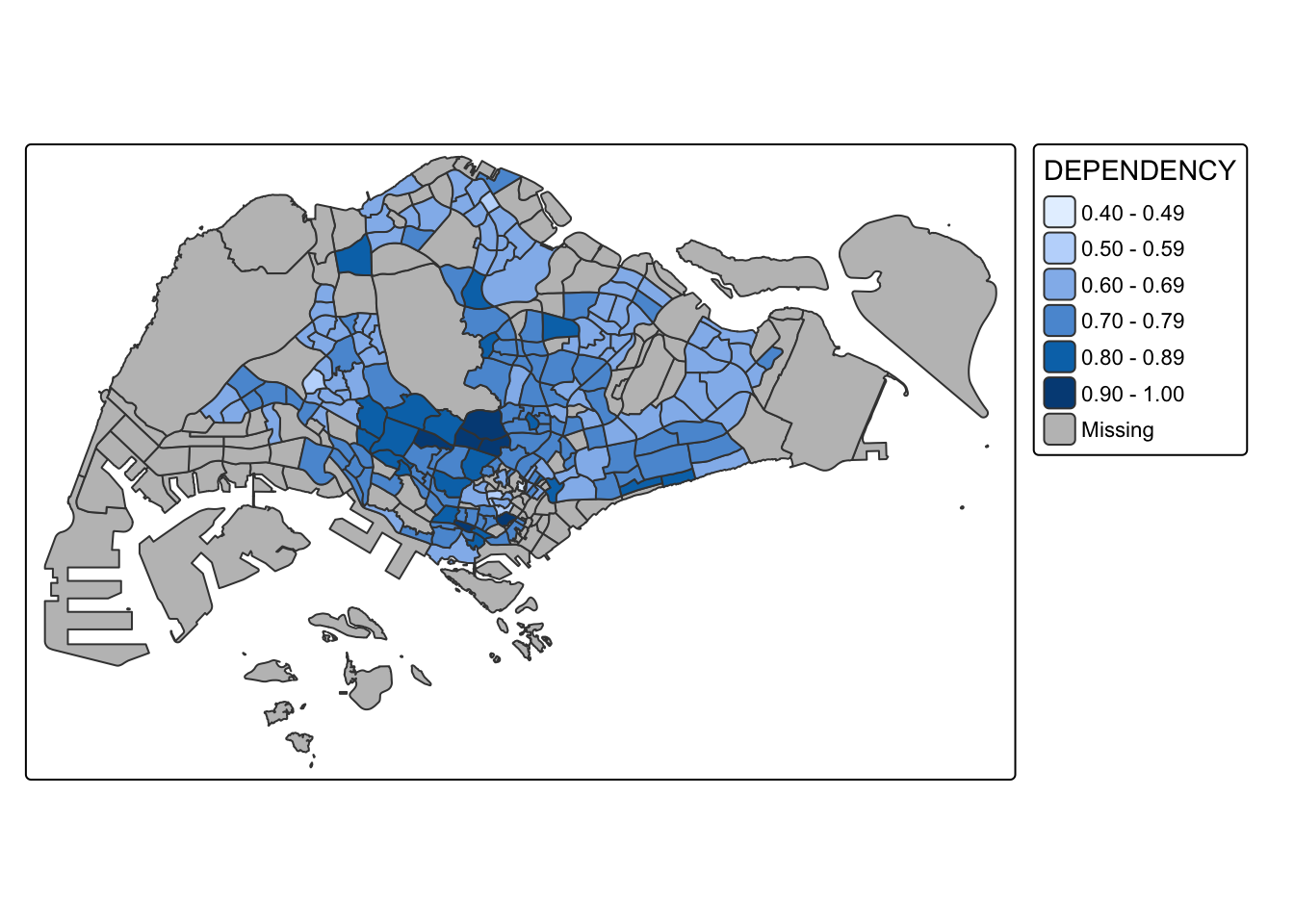
tm_shape(mpsz_pop2020) +
  tm_polygons(fill = "DEPENDENCY",
              fill.scale = tm_scale_intervals(
                style = "quantile",
                n = 5,
                values = "brewer.blues"),
              fill.legend = tm_legend(title = "Dependency ratio")) +
  tm_title("Dependency ratio by planning subzone, Singapore") +
  tm_layout(frame = TRUE) +
  tm_borders(fill_alpha = 0.5) +
  tm_compass(type = "8star", size = 2) +
  tm_scalebar() +
  tm_grid(alpha = 0.2) +
  tm_credits(
    "Source: Master Plan 2014 Subzone Boundary (URA) and Census of Population 2020 (SingStat)",
    position = c("left", "bottom"))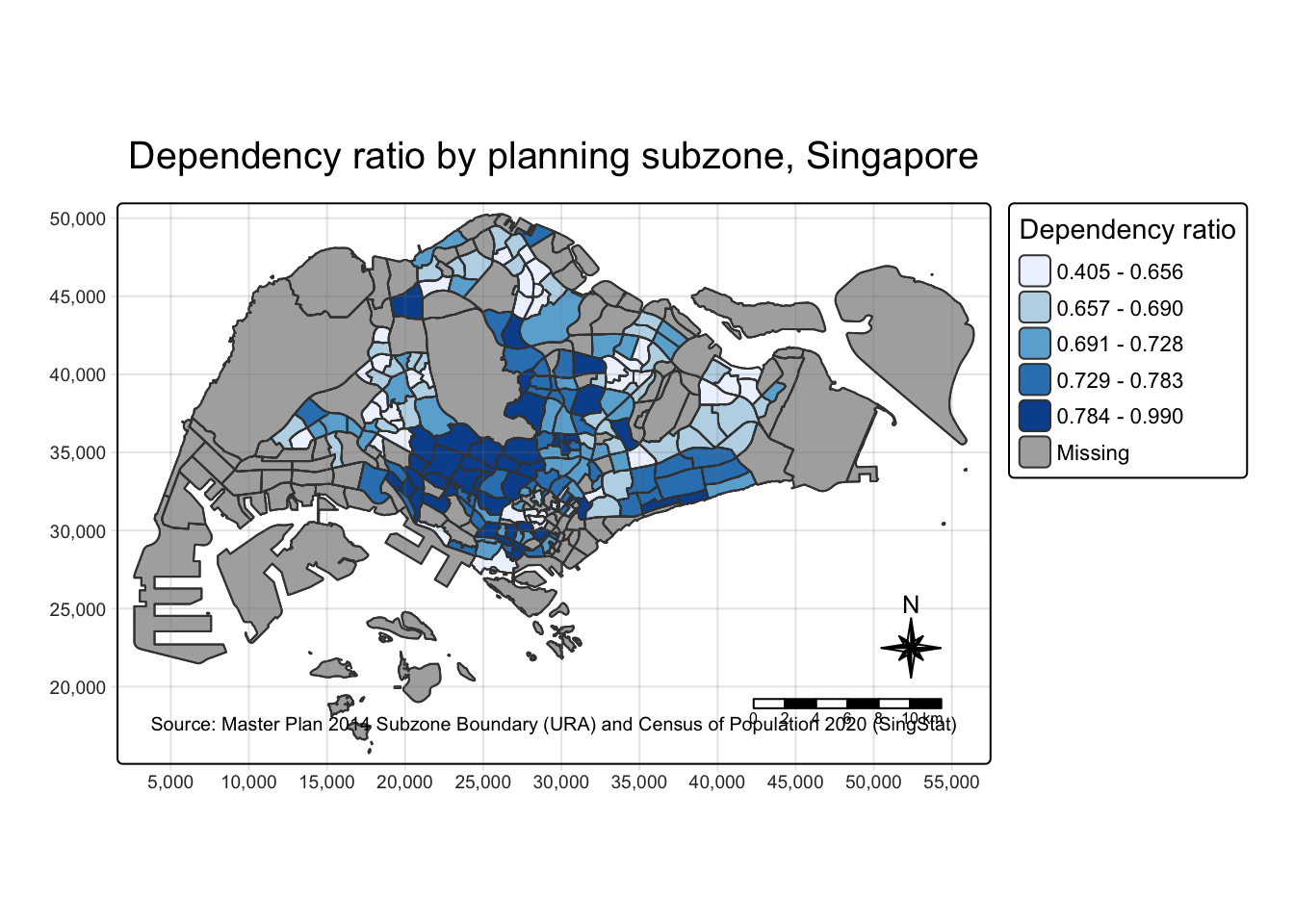
DIY: prepare choropleth maps using different classification methods and compare.
tm_shape(mpsz_pop2020) +
  tm_polygons(fill = "DEPENDENCY",
              fill.scale = tm_scale_intervals(style = "quantile", n = 5)) +
  tm_borders(fill_alpha = 0.5) +
  tm_title("Quantile")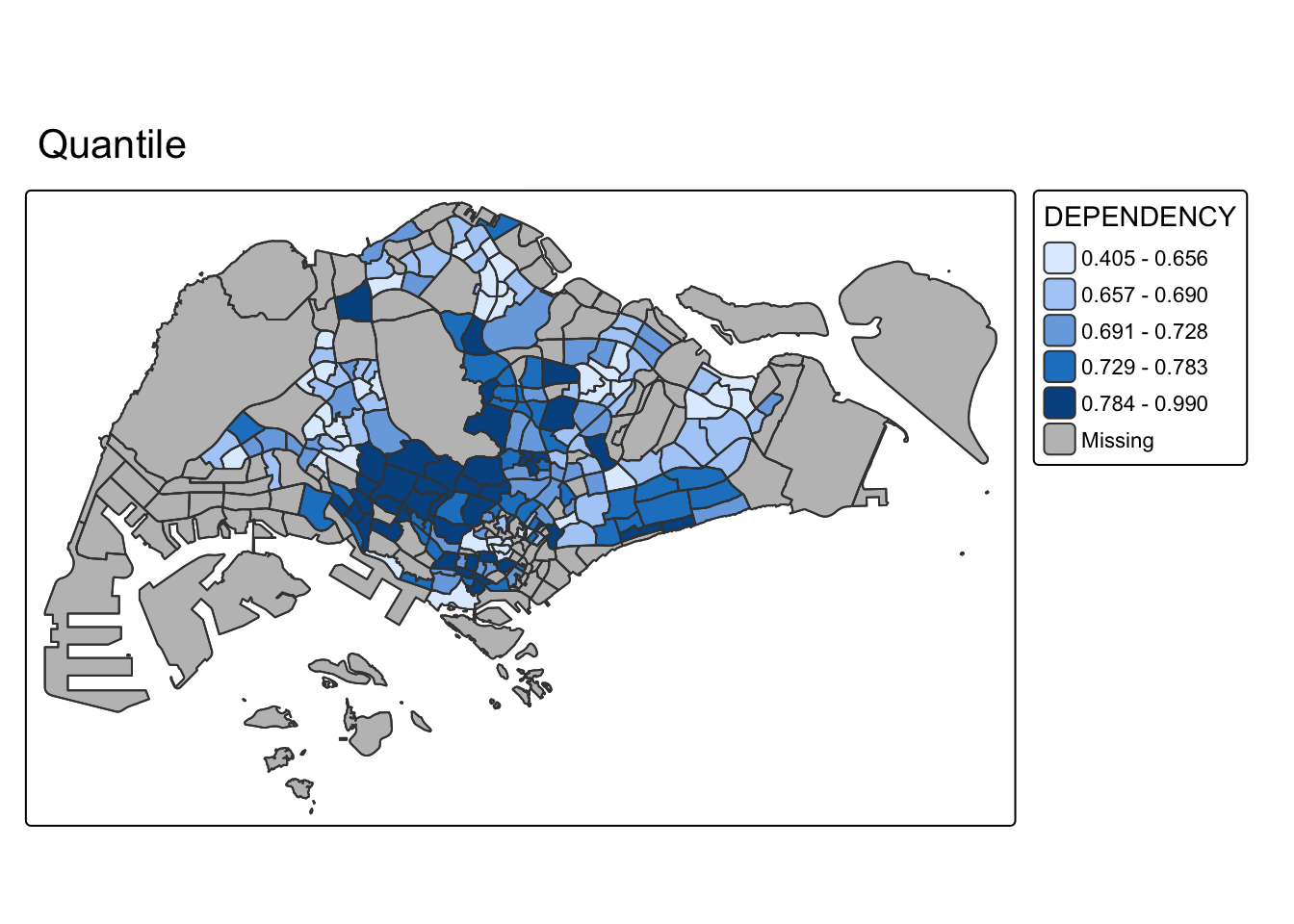
tm_shape(mpsz_pop2020) +
  tm_polygons(fill = "DEPENDENCY",
              fill.scale = tm_scale_intervals(style = "equal", n = 5)) +
  tm_borders(fill_alpha = 0.5) +
  tm_title("Equal interval")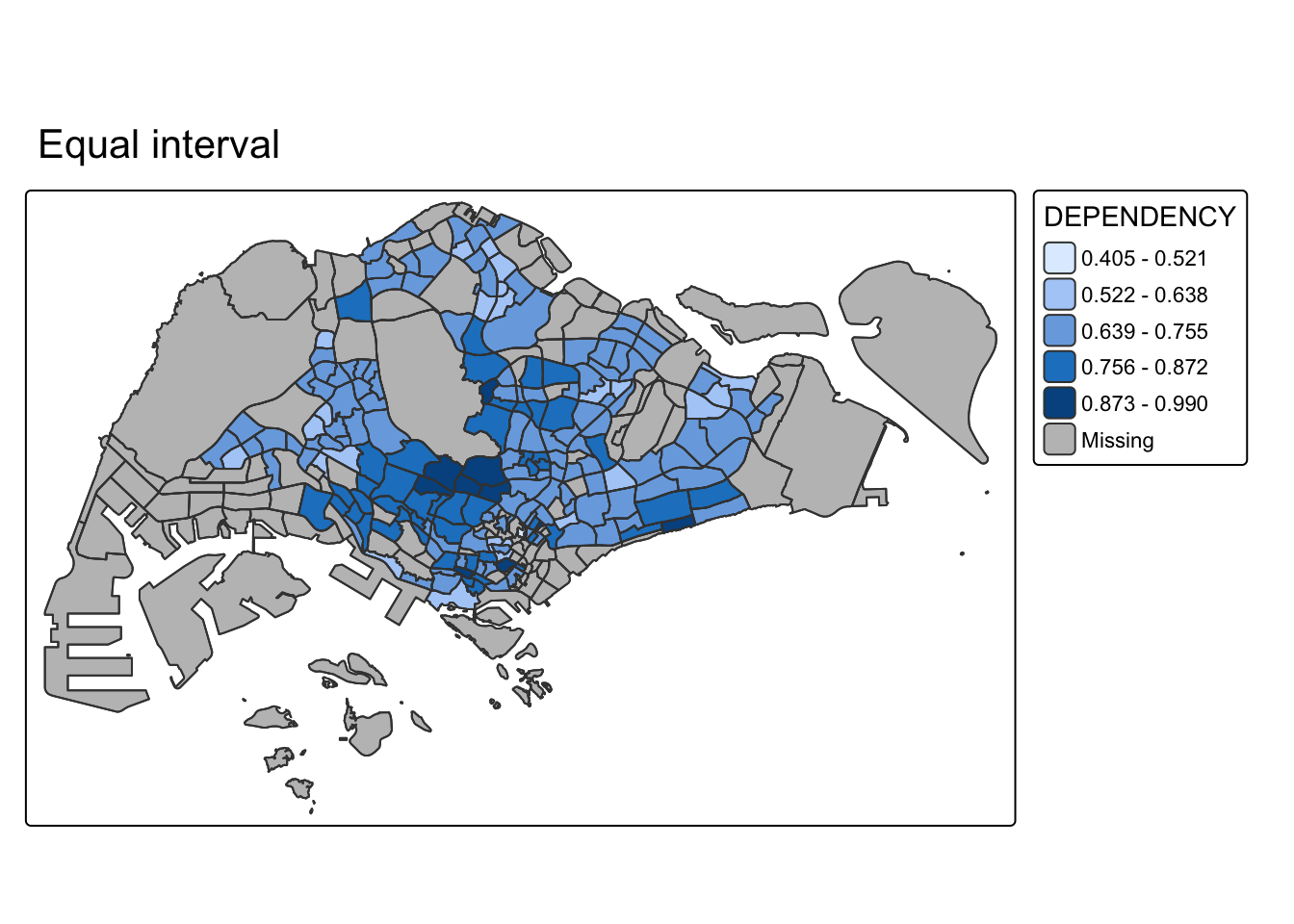
tm_shape(mpsz_pop2020) +
  tm_polygons(fill = "DEPENDENCY",
              fill.scale = tm_scale_intervals(style = "jenks", n = 5)) +
  tm_borders(fill_alpha = 0.5) +
  tm_title("Jenks natural breaks")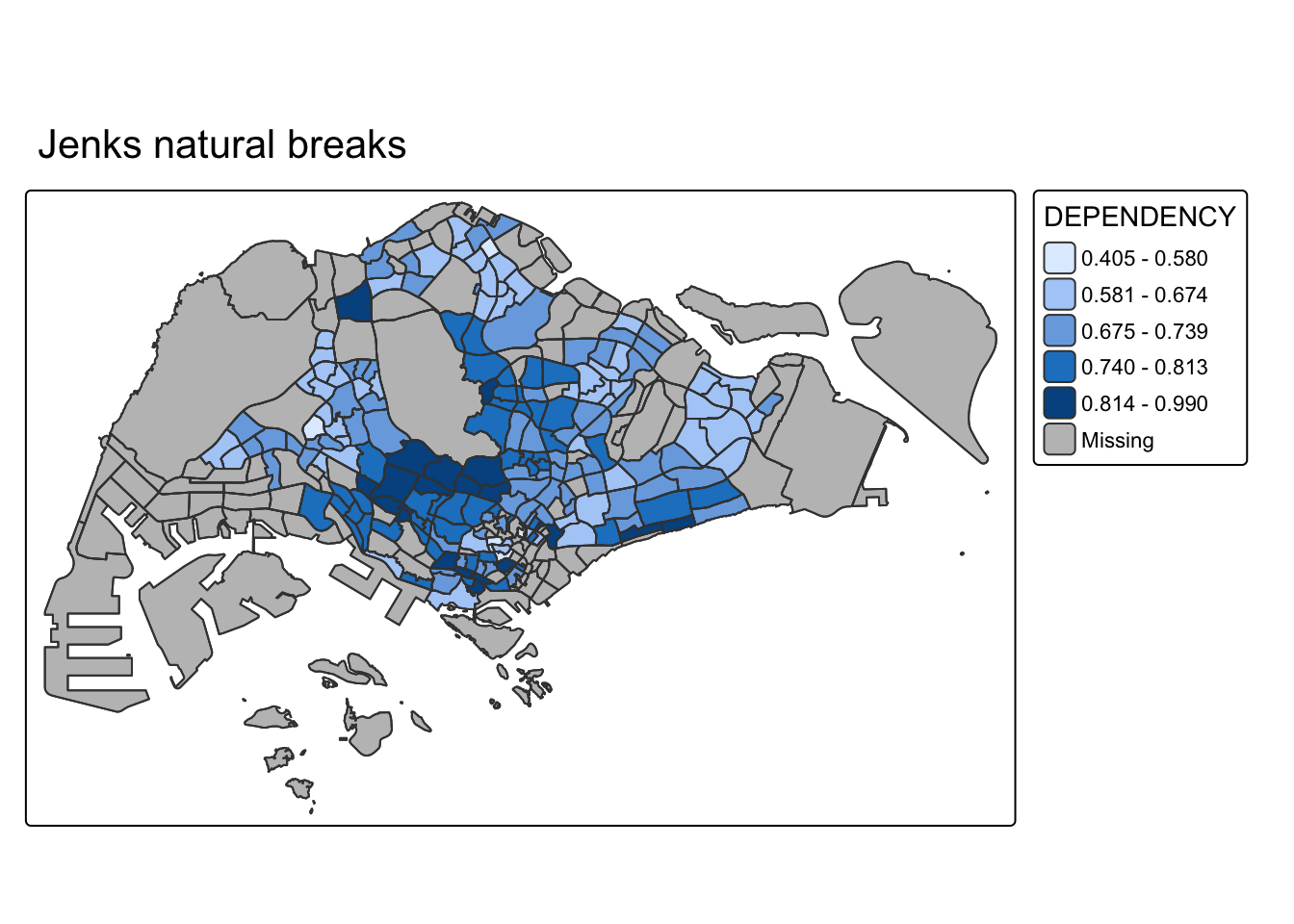
Quantile forces the same number of subzones into every bucket, which spreads colour evenly across the map regardless of how the underlying values are actually distributed. It is the most visually “balanced” of the three but can group very different dependency ratios into one class if the data clusters tightly. Equal interval slices the value range into five equal-width bands; because most subzones sit in a fairly narrow band, that concentrates almost every subzone into one or two classes and leaves the rest of the legend almost empty. Jenks looks for natural gaps in the data itself, so the class breaks land where the dependency ratio actually jumps, which here sits closer to quantile than to equal interval.
DIY: prepare choropleth maps using the same classification method but with 2, 6, 10, and 20 classes, and compare.
tm_shape(mpsz_pop2020) +
  tm_polygons(fill = "DEPENDENCY",
              fill.scale = tm_scale_intervals(style = "quantile", n = 2)) +
  tm_borders(fill_alpha = 0.5) +
  tm_title("n = 2")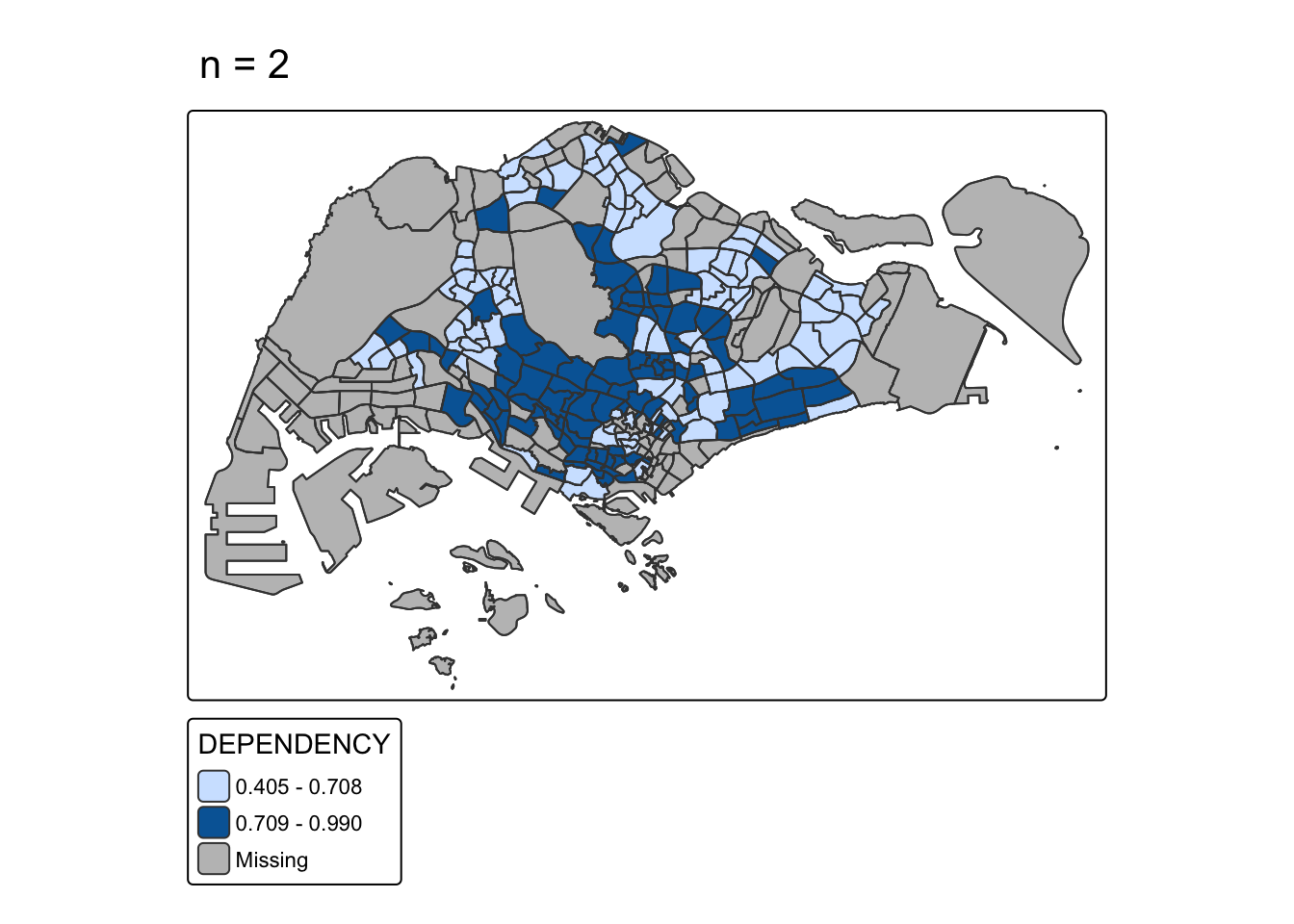
tm_shape(mpsz_pop2020) +
  tm_polygons(fill = "DEPENDENCY",
              fill.scale = tm_scale_intervals(style = "quantile", n = 6)) +
  tm_borders(fill_alpha = 0.5) +
  tm_title("n = 6")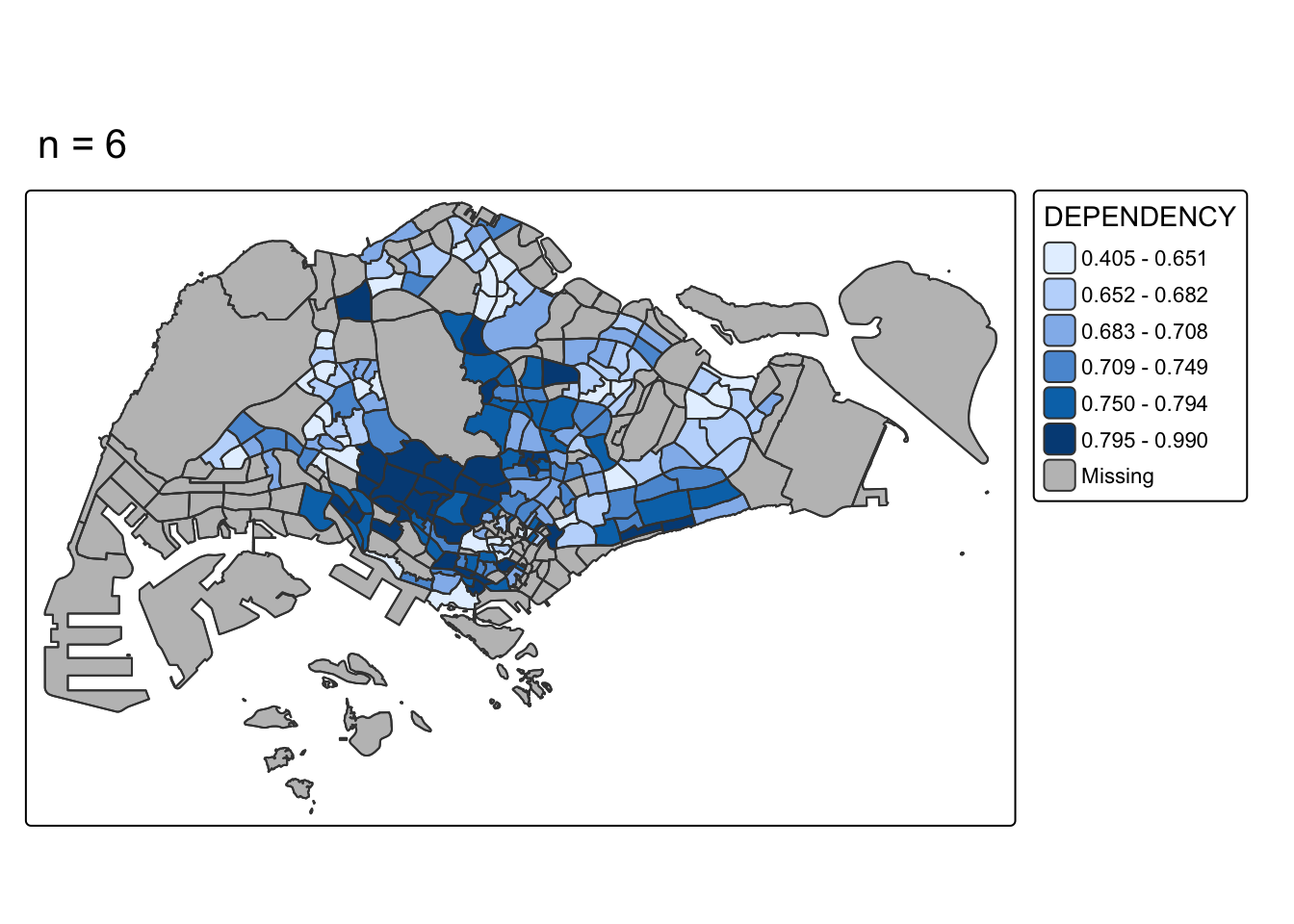
tm_shape(mpsz_pop2020) +
  tm_polygons(fill = "DEPENDENCY",
              fill.scale = tm_scale_intervals(style = "quantile", n = 10)) +
  tm_borders(fill_alpha = 0.5) +
  tm_title("n = 10")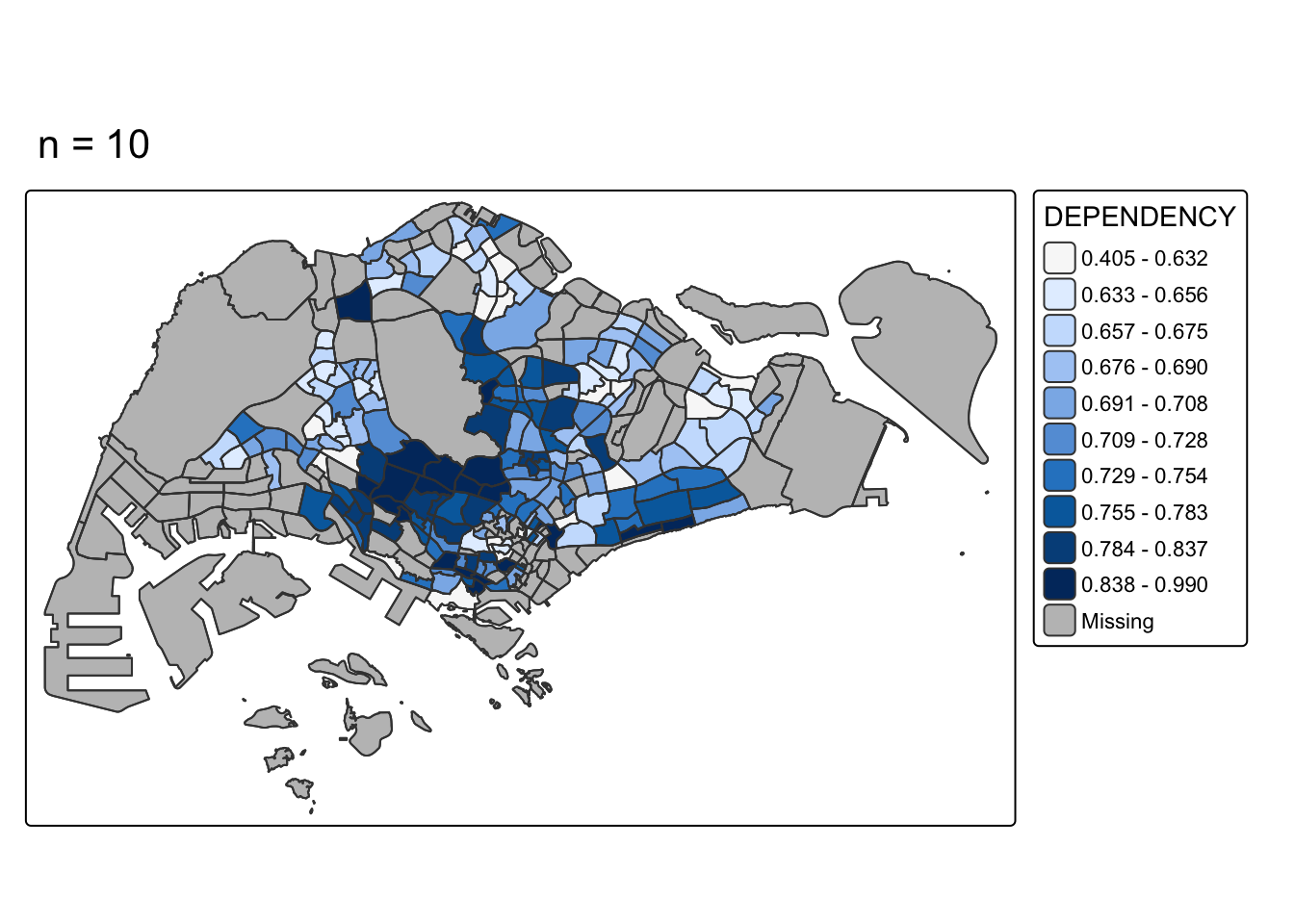
tm_shape(mpsz_pop2020) +
  tm_polygons(fill = "DEPENDENCY",
              fill.scale = tm_scale_intervals(style = "quantile", n = 20)) +
  tm_borders(fill_alpha = 0.5) +
  tm_title("n = 20")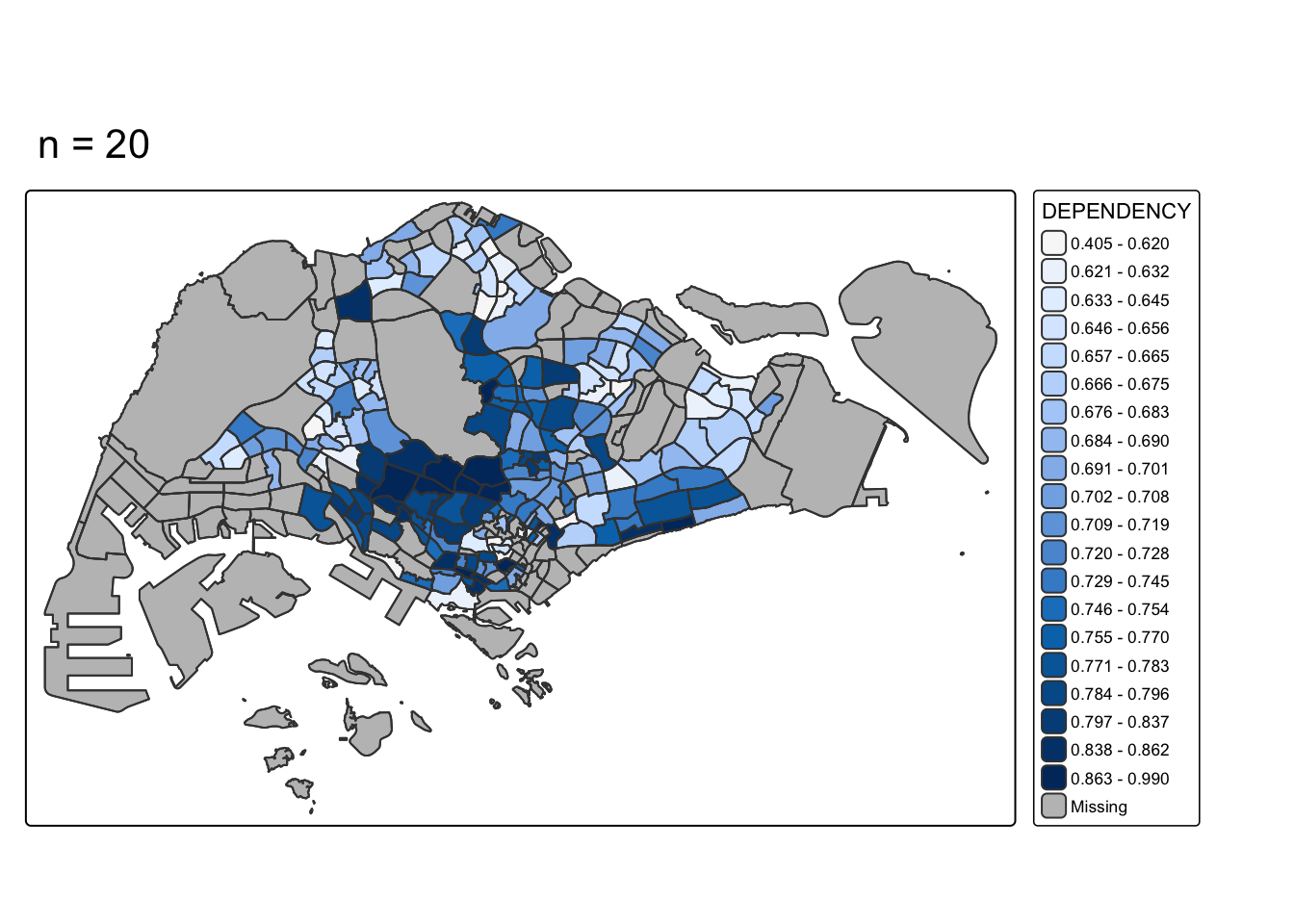
At n = 2 the map only distinguishes “below median” from “above median” dependency, which hides all the variation within each half. Pushing up to n = 10 or n = 20 starts creating classes so narrow that neighbouring subzones with almost identical ratios get visibly different colours, which reads as more precision than the data actually supports. With only 201 subzones, 20 quantile bins means roughly 10 subzones per class, each one a razor-thin slice of the value range. Something in the 5–6 range is where the map still shows a clear spatial pattern without either flattening the variation or manufacturing false precision.
tm_shape(mpsz_pop2020) +
  tm_polygons(
    fill = c("YOUNG", "AGED"),
    fill.legend = tm_legend(position = tm_pos_in("right", "bottom")),
    fill.scale = tm_scale_intervals(style = "equal", n = 5, values = "brewer.blues")) +
  tm_borders(fill_alpha = 0.5)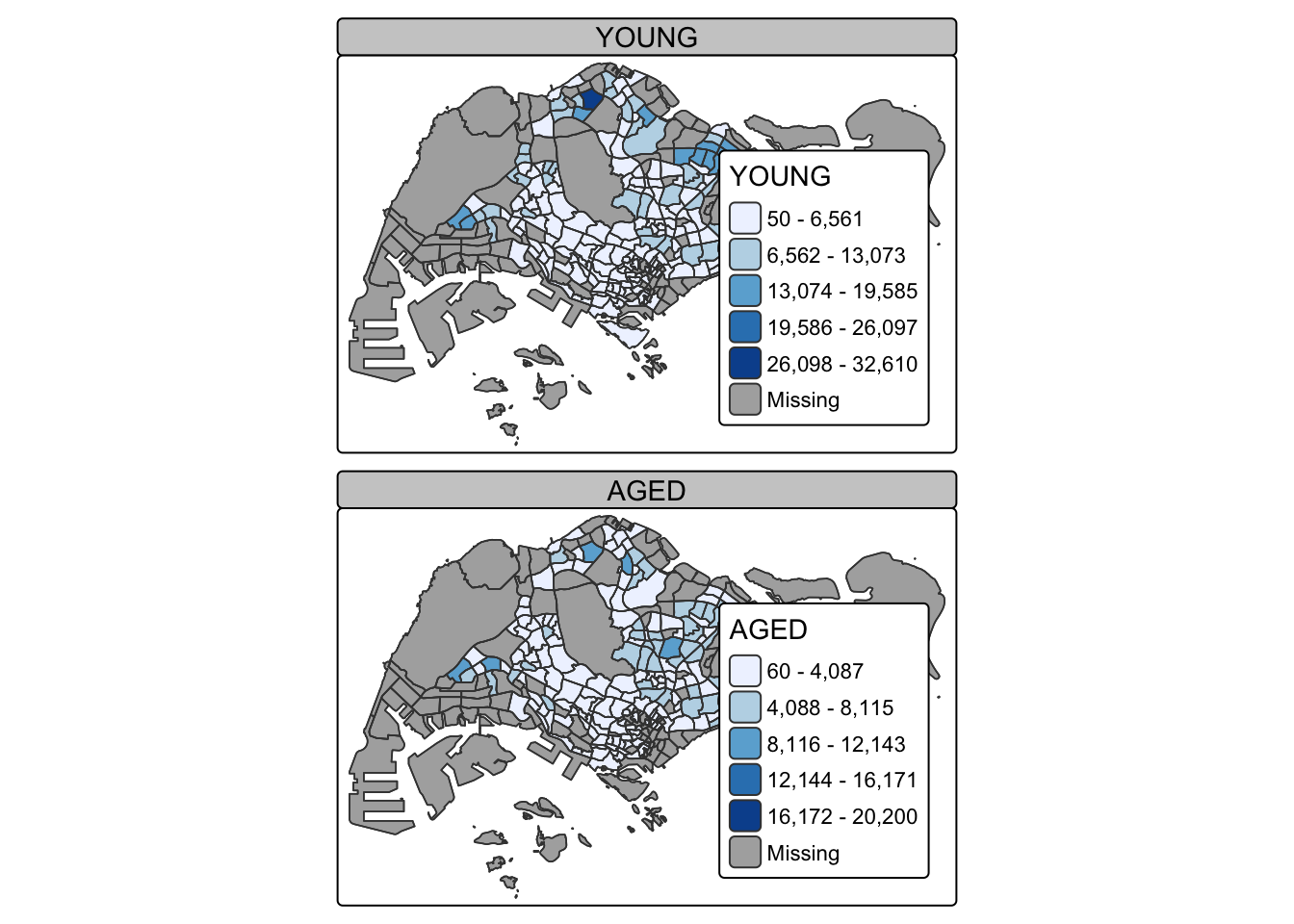
tmap_mode("view")
tm_shape(mpsz_pop2020) +
  tm_fill("DEPENDENCY",
          id = "SUBZONE_N",
          popup.vars = c("Name" = "SUBZONE_N", "Dependency" = "DEPENDENCY")) +
tm_borders()tmap_mode("plot")The biggest difference from the reference chapter was upstream of any mapping code: the exact population dataset it names has been retired, so getting from “a CSV with an age/sex breakdown” to “one row per subzone with a dependency ratio” took real wrangling rather than a straight read-and-join. The Number column mixing planning-area subtotals with subzone rows, - used for suppressed counts, and the one inconsistent "Changi- Total" label were all things I only found by actually inspecting the output at each step rather than assuming the code from the reference chapter would apply unchanged. Once the join was right, the tmap classification and class-count comparisons were the part that most changed how I’d read a choropleth map going forward. The classification method and the number of classes are both editorial choices, not neutral defaults, and they can make the same underlying data look like a strong spatial pattern or a fairly flat one.